PluginsWooCommerceon WordPress.org
Store Toolkit
One plugin instead of fourteen. One settings tab instead of fourteen.
The WooCommerce Utility Belt.
Free is the whole plugin — Pro is an optional upgrade, never a paywall. v1.1.1 · WordPress 6.0+ · PHP 7.4+ · needs WooCommerce
One price list. No lite-version tricks.
Prices in USD. Checkout is WooCommerce on bigbad.agency — the figures below are read from that checkout when this page is built, so what you see is what it charges.
Free
$0forever
COGS + Shared Inventory
- COGS tracking
- Shared variation inventory
- Unified settings panel
- HPOS compatible
- Opt-in uninstall cleanup
Most pickedPro · 1 Site
$99/year
For one store
- Everything in Free
- COGS Analytics
- Advanced Inventory Rules
- Bulk Operations
- All future pro addons
- Email support
Pro · 5 Sites
$198/year
For agencies & multi-store
- Everything in 1 Site
- Use on up to 5 sites
- Priority email support
Pro · Agency Unlimited
$396/year
For agencies running many stores
- Everything in 5 Sites
- Unlimited site activations
- Priority email support
Licence keys are per site activation. Upgrade between tiers any time — you pay the difference.
- Version
- v1.1.1 on WordPress.org
- Last update
- 1 Oct 2026
- Tested up to
- WordPress 7.0.7
- Needs
- WordPress 6.0+ · PHP 7.4+ · WooCommerce
Read from WordPress.org when this page was built (10 Oct 2026).
What it fixes.
Most WooCommerce stores run a graveyard of single-purpose plugins — one for COGS, one for shared inventory, one for scheduled sales, one for bulk edits — each adding admin menus, settings pages, and update cycles for a single tweak. eCommerce Toolkit is the opposite: one core plugin, one unified admin tab, modular addons you flip on only when you actually need them. Free ships with COGS tracking (per-product, per-variation, category defaults with margin in the products list), Shared Variation Inventory (one source pool, variations draw down by unit on sale), and Scheduled Sales. Pro unlocks the analytics layer — COGS dashboards with day-by-day revenue-vs-cost, reorder-point alerts on the shared pool, CSV bulk import/export — and the bundle license covers every future addon as it ships.
Further reading on Fishbone Talk: how to work out profit per order in woocommerce (and the four costs your report is probably missing) · how to set up woocommerce quantity discounts (bulk pricing tiers).
The value · before and after
What changes for you.
- Before
Sales look fine until you back out cost of goods and find last week’s campaign was a loss-leader nobody planned.
AfterPer-product and per-variation costs with a margin column, so you know the gross profit, not the guess.
- Before
You sell 1g, 3.5g and 7g of the same jar and stock WooCommerce treats each as its own pool, so you oversell.
AfterOne shared pool per product; each variation draws its unit count down on sale.
- Before
A plugin for COGS, one for scheduled sales, one for CSV imports, and three you forgot you installed.
AfterOne plugin, one settings tab, addons you toggle off when you do not need them.
Why it is worth it
Versus doing nothing.
- Every single-purpose plugin adds its own menu, settings page, update cadence and conflicts; the toolkit replaces the graveyard, not one tweak.
- Free is COGS, shared inventory and scheduled sales in full. Pro is the analytics layer on top of the same data.
What is in the box
Free is the whole fix. Pro adds the heavy lifting.
Free · no purchase, no account
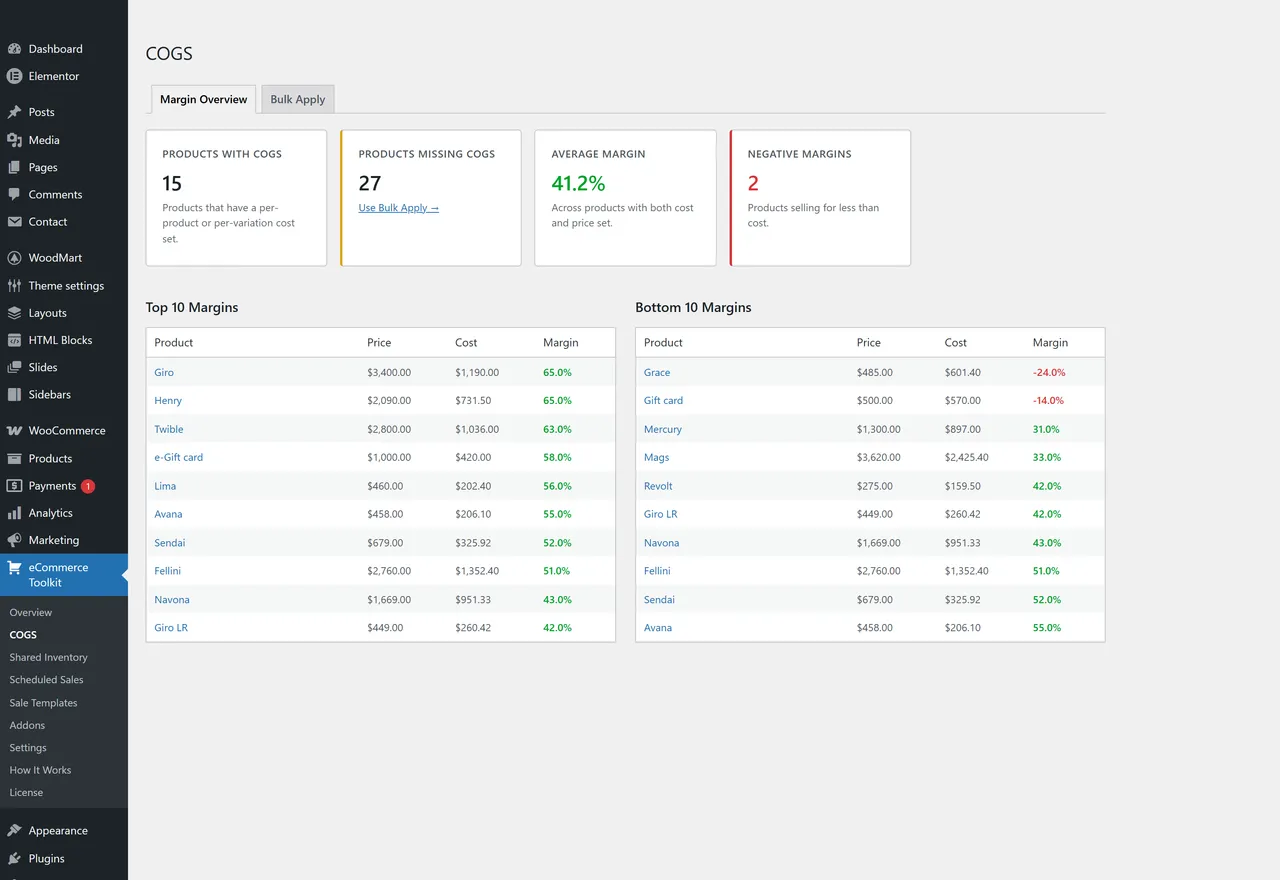
- COGS — Cost of Goods SoldPer-product cost field, per-variation costs, category-level cost defaults. Margin column on the products list.
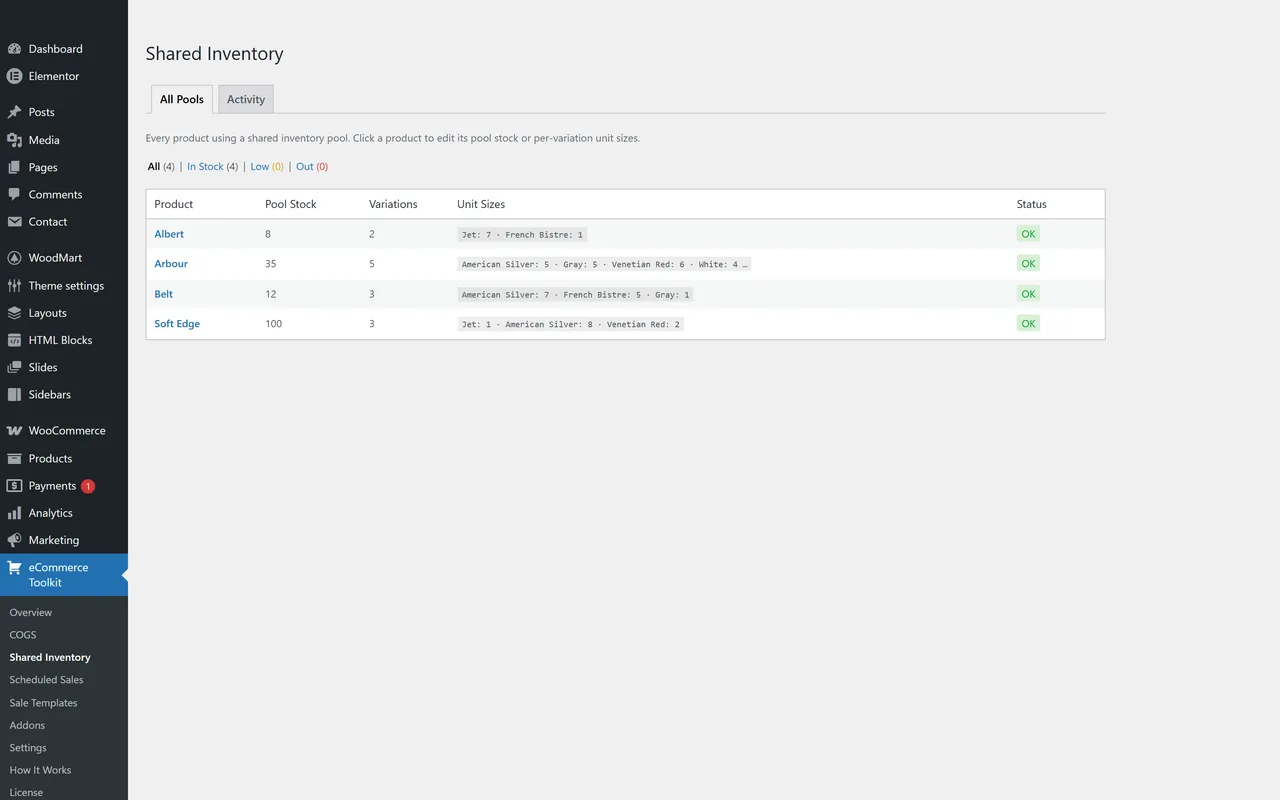
- Shared Variation InventoryDefine a shared stock pool per product. Each variation declares how many units it draws (1g pulls 1, 7g pulls 7) and the pool deducts on sale.
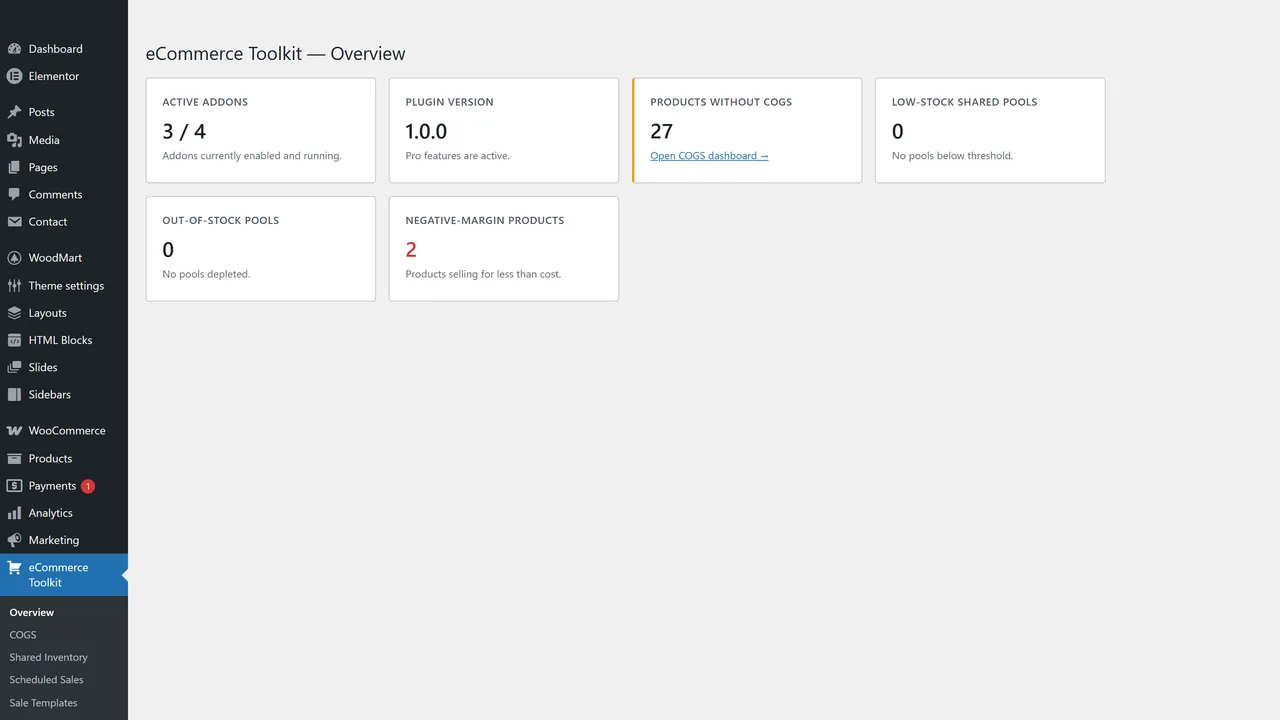
- Unified settings panelOne admin tab, every addon configurable from one place. Toggle addons on/off without uninstalling the plugin.
- First-run onboardingQuick setup notice walks new users through enabling the addons they actually want.
- In-plugin docsHow-It-Works docs embedded in the admin so you don't have to dig through a docs site to find one toggle.
- HPOS compatibleDeclared compatible with WooCommerce's High-Performance Order Storage. Future-proofed.
- Opt-in uninstall cleanupRemoves plugin data on uninstall only if you turn it on. Default leaves your data alone.
Pro adds · from $99/year
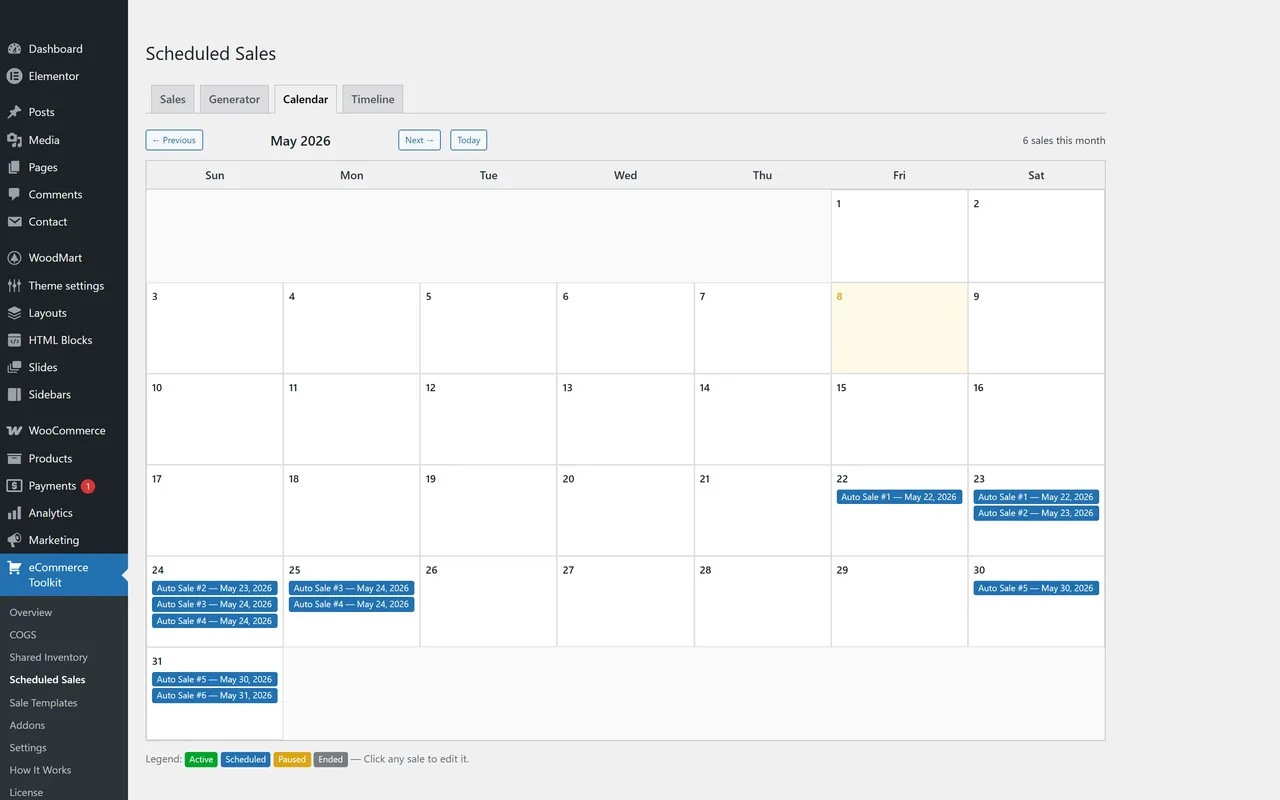
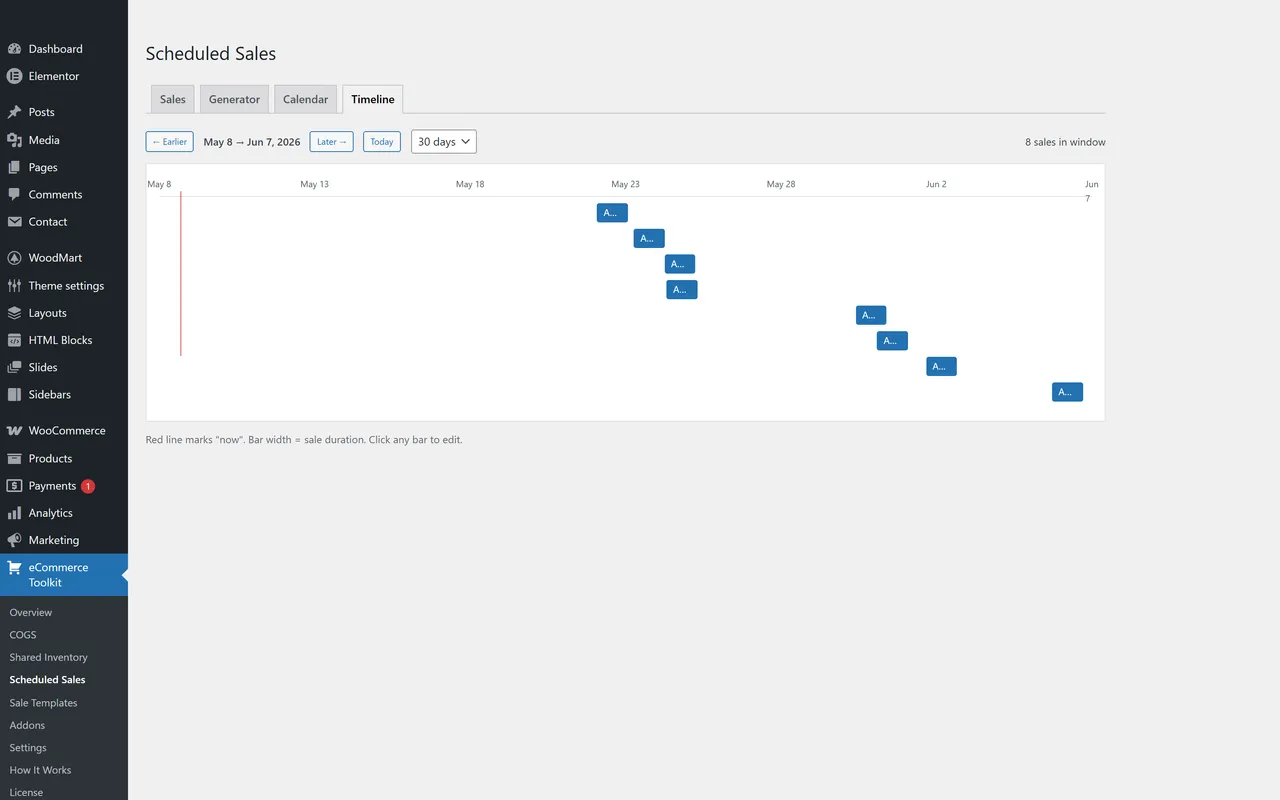
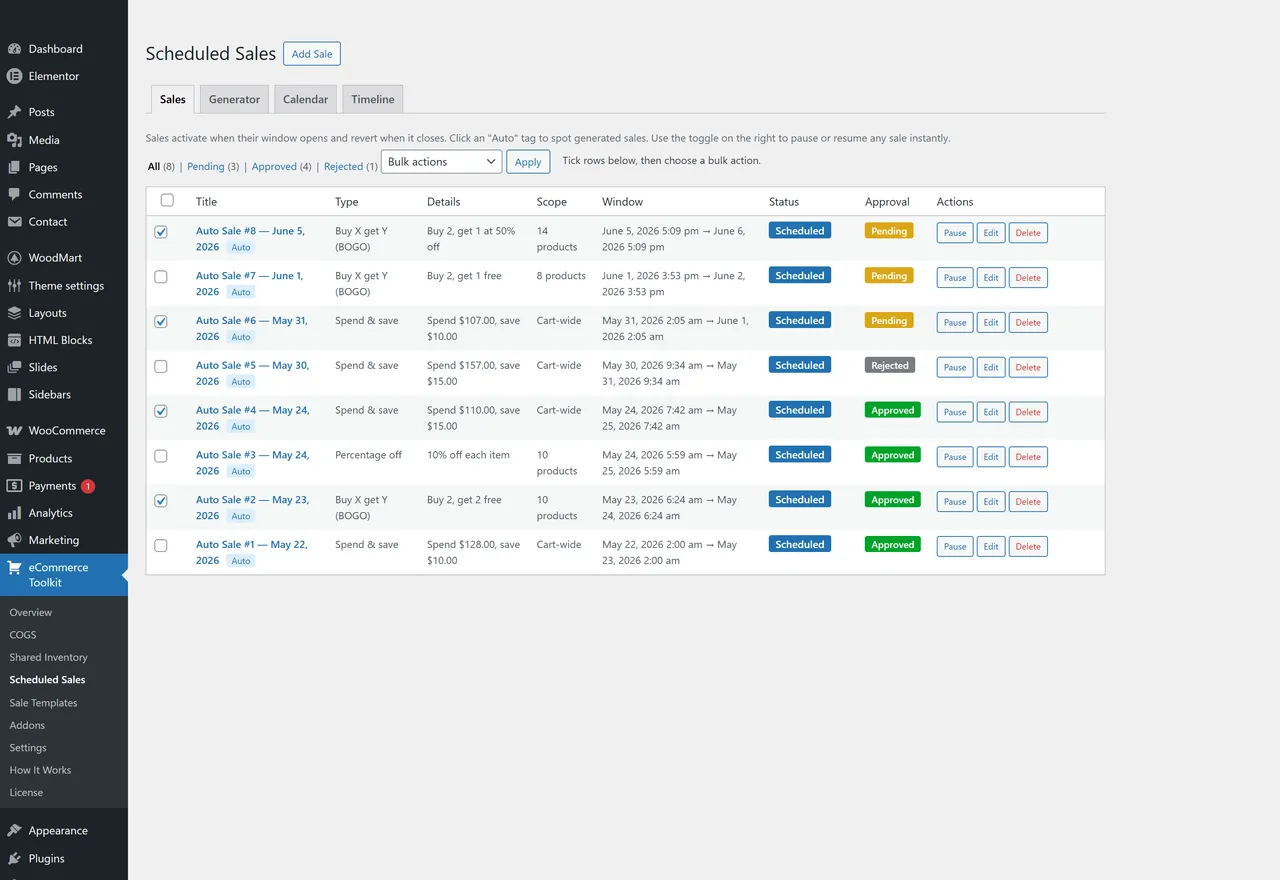
- Scheduled Sales ProAn approval queue for generated sales (bulk approve, reject, shift dates, delete), reusable sale templates, and Calendar and Timeline views of every scheduled sale.
- COGS Analytics7, 30 or 90 days of revenue, effective cost (cost + overhead + gateway fees), gross profit and margin from your orders, with a daily revenue-vs-cost chart and top / lowest-margin products and categories. Items sold without a cost are listed separately, never counted as 100% margin.
- Advanced Inventory RulesPer-product low-stock thresholds on the shared variation pool (applied everywhere the free plugin judges stock), reorder points and quantities, an Inventory Alerts page, and a daily reorder email to the site admin.
- Bulk OperationsCSV export and import of COGS data (one row per simple product and per variation), with a preview before anything is written. Critical for shops with hundreds of SKUs.
- Future addon slotsIf we ship another Pro addon, the bundle license includes it. We only list addons that exist.
If any of these sound like you.
- 01
WooCommerce stores running blind on actual margin
Your sales reports look fine until you back out the cost of goods and realize the discount campaign last week was a loss-leader nobody planned. Per-product COGS input plus category defaults plus a daily Revenue-vs-COGS chart turns 'I think we made money' into 'we made $X in gross profit this week.'
- 02
Shops selling weights and units out of a shared jar
Dispensaries selling 1g/2g/3.5g/7g of the same flower. Bulk-goods sellers splitting one 50lb sack into 1lb, 5lb, and 10lb SKUs. Stock WooCommerce treats every variation as its own pool, so you oversell. Shared Variation Inventory makes one source pool that every variation draws from on sale, by the unit-count you define.
- 03
Operators tired of the WooCommerce plugin graveyard
You currently have a plugin for COGS, a plugin for scheduled sales, a plugin for CSV imports, and three you forgot you installed. Each one has its own settings page, its own update cadence, its own conflicts. This consolidates the lot under one admin tab and lets you toggle addons off when you don't need them.
- 04
WooCommerce agencies wiring up serious shops
Every client needs slightly different tools. The modular architecture means you flip on what they need and leave the rest dormant. The bundle license covers every Pro addon — current and future — across all the client shops the 5-site or Agency tier permits.
Every screen is real · 6
In the admin.
Questions people actually ask.
Does this require WooCommerce?
Yes. Every addon — current and planned — works with WooCommerce data: products, variations, orders, categories. A non-WC site has nothing for the toolkit to operate on.
What does "modular addon architecture" actually mean?
Each feature is a self-contained addon module that registers with a central loader. Free addons (COGS, Shared Variation Inventory, Scheduled Sales) ship inside the core plugin. Pro addons live in a separate pro tier and are gated behind license validation. You toggle each addon on or off from one settings tab. Don't need shared inventory? Turn it off — the code stops loading. No bloat tax for features you don't use.
Why "toolkit" instead of separate plugins for each feature?
Because you'd end up with eight different settings pages, eight different update cycles, eight different vendors, and eight different reasons your shop dashboard looks like a yard sale. Toolkit gives you one tab, one update, one vendor, one consistent UX — and a single license that covers every Pro addon, current and future.
What's in the free version vs. Pro?
Free:
- COGS tracking (per-product, per-variation, category-level cost defaults, global fallback)
- Margin column on the WooCommerce product list, with Bulk Apply tool (set / increase % / decrease % / clear)
- Shared Variation Inventory — shared stock pool with per-variation unit draw amounts, cart/checkout overselling protection, all-pools dashboard, activity feed
- Scheduled Sales — manual sale creation + Schedule Generator that mixes 5 sale types (% off, $ off, BOGO, free gift on threshold, spend & save)
- Top-level admin menu with Overview health dashboard
- HPOS compatibility, opt-in uninstall cleanup
Pro adds:
- Scheduled Sales Pro — Calendar view (month grid), Timeline view (Gantt-style bars), Approval queue with bulk actions, Sale Templates (reusable rule sets)
- COGS Analytics — 7, 30 or 90 days of revenue, effective cost, gross profit and margin from your orders, a daily revenue-vs-cost chart, and top / lowest-margin products and categories. Items sold without a cost are listed separately, never counted as 100% margin.
- Advanced Inventory Rules — per-product low-stock thresholds, reorder points and reorder quantities, an Inventory Alerts page, and a daily reorder email to the site admin.
- Bulk Operations — CSV export and import of your cost data, with a preview before anything is written.
What's coming next on the addon roadmap?
Nothing we will promise here. Pro today is the four addons above: Scheduled Sales Pro (approval queue, sale templates, Calendar, Timeline), COGS Analytics, Advanced Inventory Rules, and Bulk Operations. If we ship another Pro addon, your bundle license includes it; until it ships we do not list it. Tell us what you'd buy and it goes on the list.
How does the license work?
Pro Bundle licenses are per-site activation. The 1-Site tier covers one production store. The 5-Site tier covers up to five. Agency Unlimited is unlimited activations under one license. License checks run against bigbad.agency over HTTPS with a 24-hour cache, fail-closed on hard errors. Per-addon individual licensing is on the roadmap but the Pro Bundle is currently the cleanest way to unlock all addons.
What does the license cost?
There are three annual plans: Single Site, 5 Sites and Unlimited (Agency). Current prices are shown on the plugin's page, read live from the store.
Renews annually for continued updates and support. Your store keeps running on the version you have if you let the license lapse — you just stop getting new features and addon releases.
Can I switch tiers later?
Yes. Upgrade from 1-Site to 5-Site or Agency at any time — pay only the difference for the rest of your billing period.
Is COGS data isolated from WooCommerce's core data?
COGS values are stored as standard WooCommerce post meta on products and variations. They're not in some separate database that breaks when you change themes or migrate stores — they live alongside your existing product data and are fully exportable.
Do scheduled sales modify my product prices in the database?
No. Sales apply via WooCommerce price filters during the active window only. When the sale ends, the price reverts instantly — no migration, no leftover meta, no risk of stale "sale price" values lingering on products.
Does it work with my page builder / theme?
Yes. The toolkit only adds admin-side features (data fields, settings panels, reports) and uses standard WooCommerce hooks for storefront effects. It doesn't override any front-end templates or fight your theme.
What about HPOS (High-Performance Order Storage)?
Fully compatible. The plugin declares HPOS compatibility on activation.
Where do I get support?
Free version: WordPress.org plugin support forum. Pro: email support@bigbad.agency with your license key. Average first-response under 24 business hours.
Also on the shelf
More free plugins.
- Free on WordPress.org
AI Data Remover
ChatGPT and Elementor left invisible junk in your HTML. Find it. Strip it.
Details → - Free on WordPress.org
Deep eCommerce Insights
WooCommerce reports are a graveyard. We dig you out.
Details → - Free on WordPress.org
Product-Linked Attributes Mapper
Your attribute terms aren't strings. They're products. Wire them up.
Details → - The shelf
All plugins
The whole catalogue, versions read from WordPress.org.
Browse →
Support: support@bigbad.agency · reviews on WordPress.org