
PluginsWordPresson WordPress.org
Store Hours
A cutoff notice that respects your kitchen's actual prep time.
Hours, Honest. Cutoffs, Clear.
Free is the whole plugin — Pro is an optional upgrade, never a paywall. v1.5.2 · WordPress 6.0+ · PHP 7.4+
One price list. No lite-version tricks.
Prices in USD. Checkout is WooCommerce on bigbad.agency — the figures below are read from that checkout when this page is built, so what you see is what it charges.
Free
$0forever
Display & shortcodes
- Weekly schedule + holidays
- Sticky bar + widget + 4 shortcodes
- WooCommerce notices
- All styling options
Most pickedPro · 1 Site
$39/year
For one delivery shop
- Everything in Free
- Order cutoff notice (display-only)
- Prep buffer + per-day overrides
- Cutoff-aware countdown
- Email support
Pro · 5 Sites
$99/year
For agencies & multi-location
- Everything in 1 Site
- Use on up to 5 sites
- Priority email support
Licence keys are per site activation. Upgrade between tiers any time — you pay the difference.
- Version
- v1.5.2 on WordPress.org
- Last update
- 23 Jul 2026
- Tested up to
- WordPress 7.0.4
- Needs
- WordPress 6.0+ · PHP 7.4+
Read from WordPress.org when this page was built (15 Sept 2026).
What it fixes.
Your hours are scattered across Google, Facebook, your contact page, and a footer widget — and none of them agree. You close at 9 but you're getting tickets at 8:54 the kitchen has no chance of fulfilling. Store Hours fixes the display side: a real-time open/closed status (sticky bar, floating widget, or shortcodes) plus weekly schedules, holiday overrides, and "closing soon" messaging. Pro adds an order-cutoff notice — your displayed status flips to "closed for orders" 30 minutes before you lock the door and an advisory notice shows on cart/checkout, so shoppers see the last-call warning. Note: the cutoff is display-only; it changes what customers see, it does not block checkout.
The value · before and after
What changes for you.
- Before
Your hours live in five places and none of them agree, so the phone rings all day with the same question.
AfterOne schedule, shown in real time on every page, so the site answers it.
- Before
An order lands at 8:54 that the kitchen cannot finish by 9.
AfterWith Pro the status flips to closed-for-orders before you lock the door and cart and checkout show the last-call notice.
- Before
Closed Monday, late Thursday, early on Christmas Eve, and someone still shows up Monday at 7am.
AfterMultiple ranges per day plus holiday overrides, so the sticky bar tells the truth on the odd days too.
Why it is worth it
Versus doing nothing.
- Doing nothing keeps the front-of-house answering the phone; a generic hours widget shows a table, not a live open/closed answer with closing-soon messaging.
- The free build is the whole display fix. Pro is only for kitchens that need the cutoff and prep buffer.
Straight answers
What it does not do.
- The cutoff is display-only: it changes what customers see; it does not block checkout.
What is in the box
Free is the whole fix. Pro adds the heavy lifting.
Free · no purchase, no account
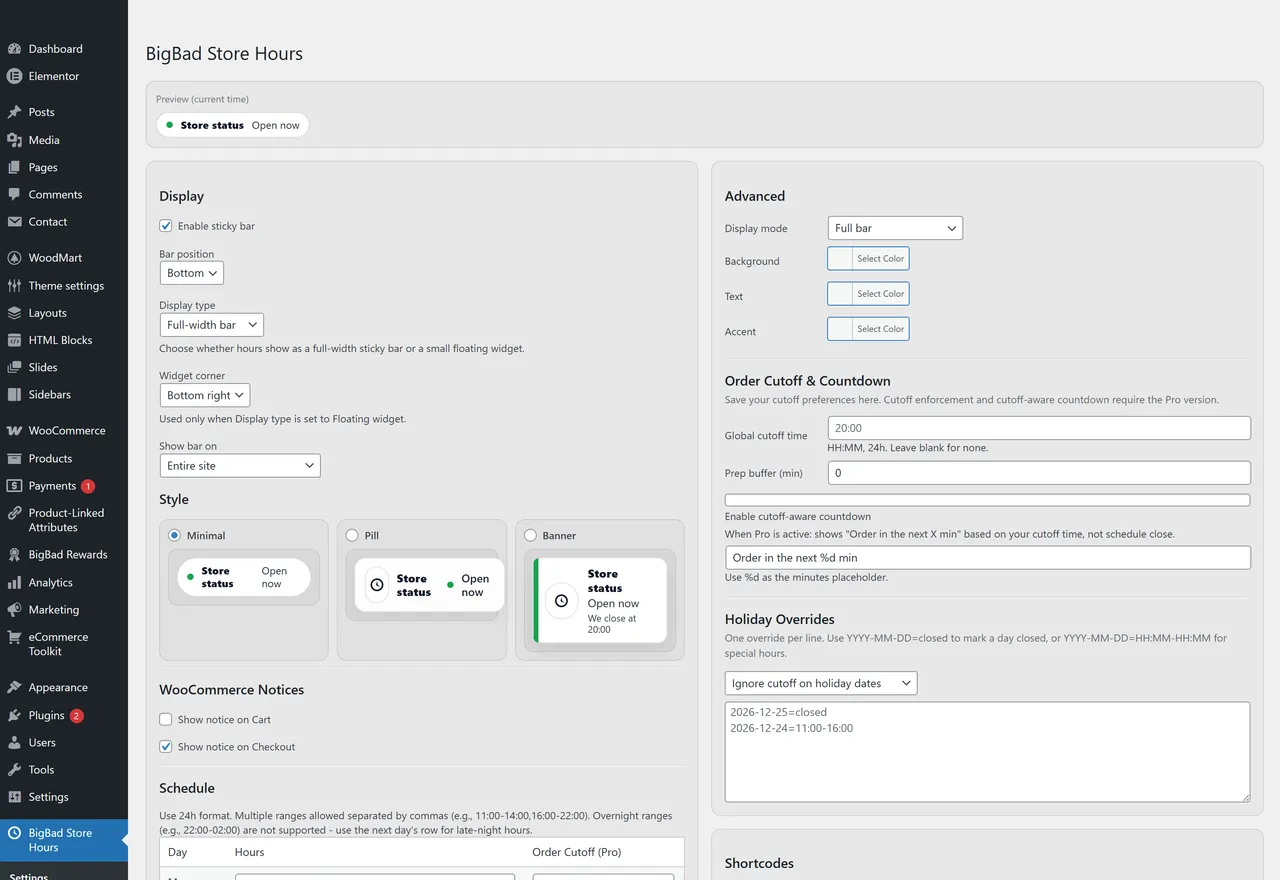
- Weekly schedule editorMon-Sun with multiple time ranges per day (e.g. 09:00-12:00, 13:00-17:00).
- Holiday overridesClosed days or custom hours for specific dates.
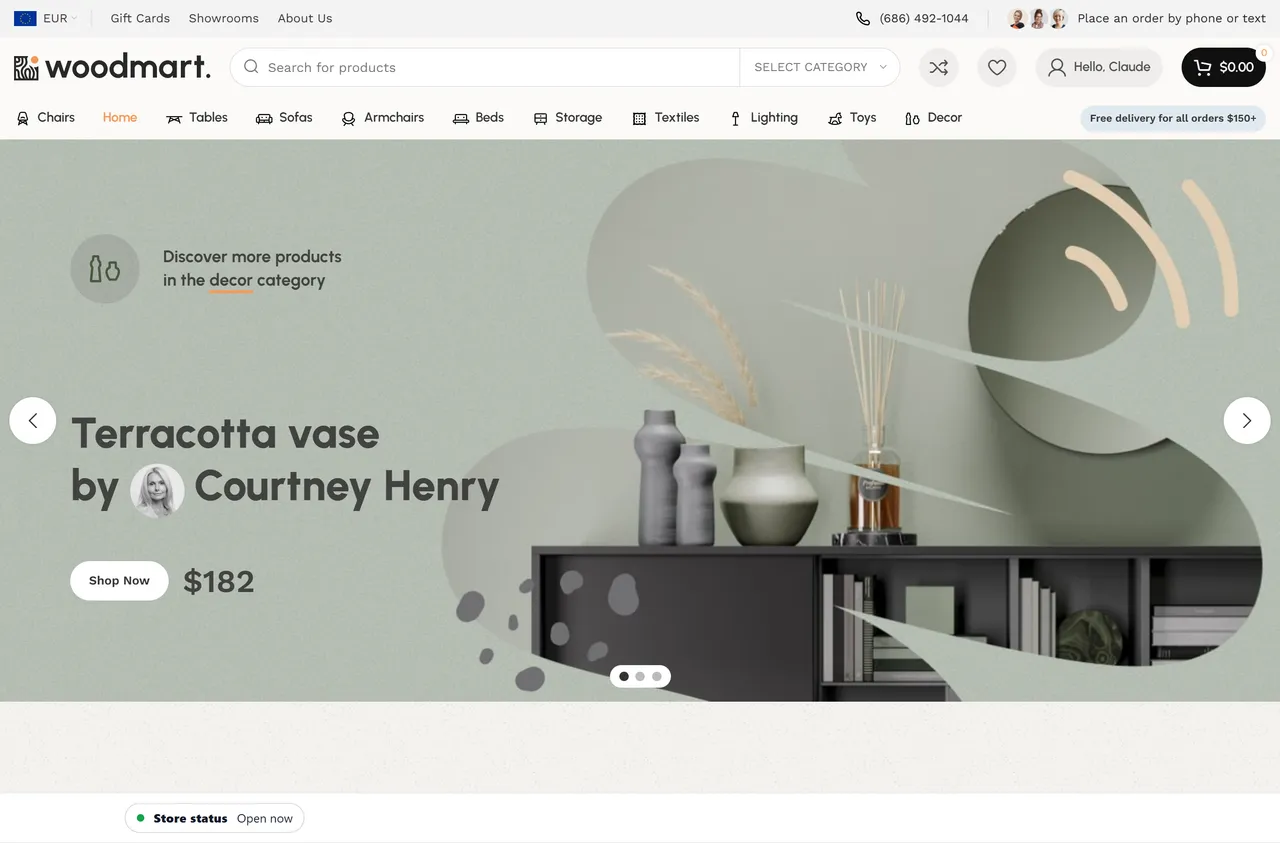
- Sticky barTop or bottom of every page. 3 style presets: minimal, pill, banner.
- Floating widgetPosition-anywhere status indicator with conversational messaging.
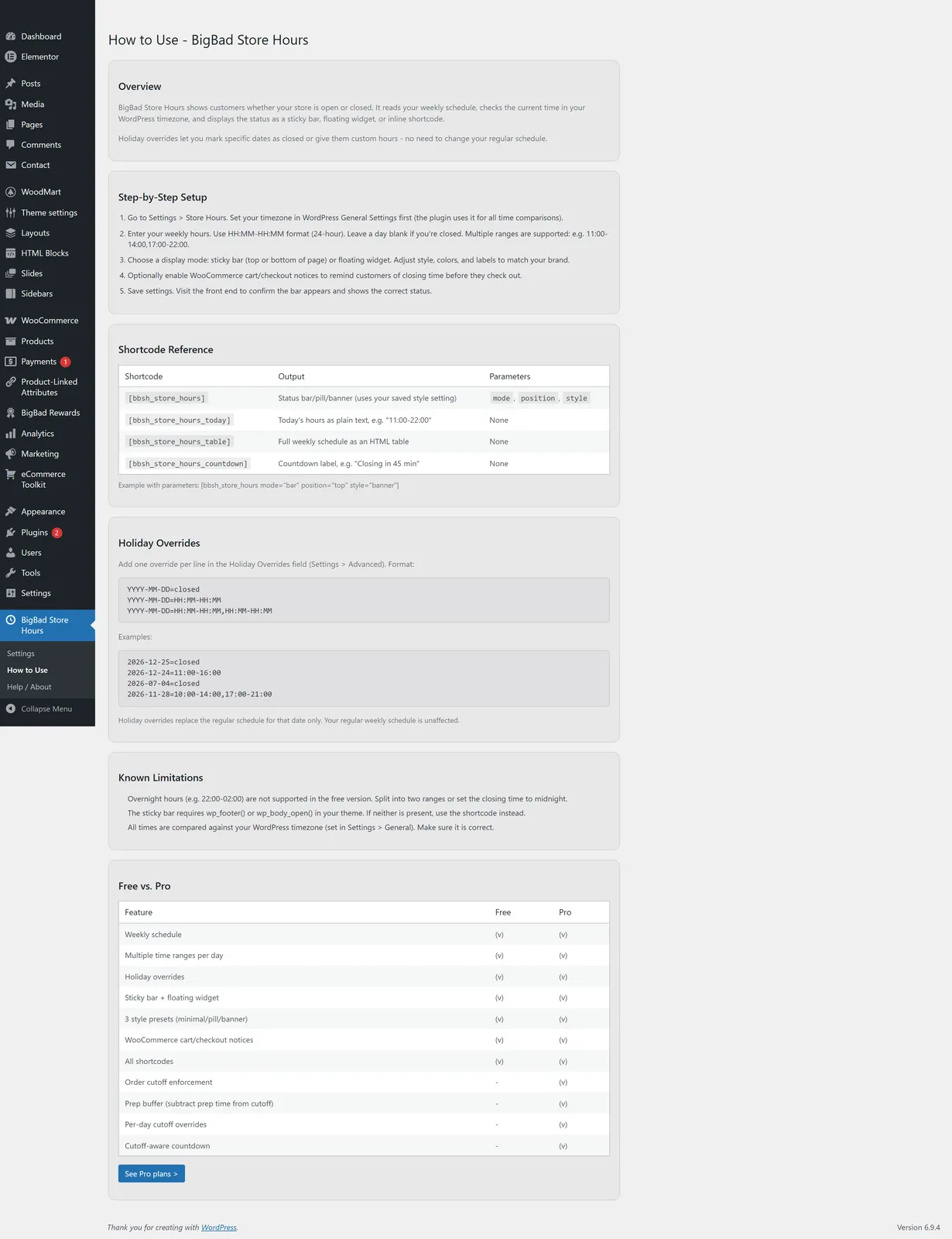
- 4 shortcodes[bbsh_store_hours], [bbsh_store_hours_today], [bbsh_store_hours_table], [bbsh_store_hours_countdown].
- WooCommerce noticesOptional cart and checkout notices when you're closed or closing soon.
- "Closing soon" messagingCustomizable threshold (e.g. notify visitors 30 min before close).
- Color, font, shadow customizationMake it match your site without writing CSS.
Pro adds · from $39/year
- Order cutoff noticeFlips your displayed status to "closed for orders" X minutes before close and shows an advisory notice on cart/checkout, even while the store is technically still open. Display-only — it changes what customers see; it does not block checkout. A clear last-call heads-up for delivery, kitchens, dispensaries.
- Prep bufferSubtract minutes from cutoff time. Account for prep, packing, and out-the-door time.
- Per-day cutoff overridesDifferent cutoff times for different days. Friday cutoff at 9pm, Sunday cutoff at 7pm.
- Cutoff-aware countdownThe countdown shortcode ticks to your cutoff time, not your close time. Customers see how long they have to actually order.
If any of these sound like you.
- 01
Restaurants and cafés taking 'are you open?' calls all day
Your phone rings ten times a day with the same question and your hours are already on your homepage somewhere. Sticky bar across every page, real-time open/closed status, holiday overrides — let the site answer it so your front-of-house doesn't have to.
- 02
Delivery shops, ghost kitchens, and dispensaries
Your kitchen needs 30 minutes to finish the last ticket. Your store closes at 9. Today an order came in at 8:54 and a one-star review came in at 9:42. Pro's cutoff notice flips your status to "closed for orders" and shows a last-call advisory on cart/checkout before you close the door — a clear heads-up so late tickets slow down. (Display-only; it does not block checkout.)
- 03
Local retail with weird hours
You're closed Monday, open late Thursday, closed early Christmas Eve. The weekly schedule editor handles multiple time ranges per day and the holiday overrides handle the rest. Sticky bar shows the truth in real-time so nobody shows up Monday at 7am.
- 04
Service businesses with appointment-driven hours
Salons, repair shops, studios, clinics — your hours change and your customers need to see the current truth, not last quarter's PDF. Set it once, four shortcodes drop the schedule into any page, and the floating widget gives a glance-at-status indicator from anywhere on the site.
Every screen is real
In the admin.

Questions people actually ask.
Does this require WooCommerce?
No. BigBad Store Hours runs on any WordPress site. WooCommerce integration is optional and only affects cart/checkout notices when active.
What time format should I use for hours?
Both work:
- **24-hour:** `10:00-21:00` or `09:30-17:15` - **12-hour:** `10am-9pm` or `9:30am-5:15pm`
Use `start-end` and separate multiple ranges with commas: `09:00-12:00, 13:00-17:00`.
Can I disable the floating bar and just use shortcodes?
Yes. Disable the bar in **Settings → Display** and place shortcodes wherever you want.
How do holiday overrides work?
In **Settings → Holidays**, enter a date in `YYYY-MM-DD` format and either mark it closed or set custom hours. Holiday overrides take precedence over the weekly schedule for that date.
What's the difference between the free and pro versions?
The free version shows your hours and tells customers if you're open. The pro version adds an **order cutoff notice** — so your delivery shop flips to "closed for orders" and shows a last-call advisory on cart/checkout 30 minutes before close, even though the door is technically still open. Note it's display-only: it warns customers, it does not block checkout. If you're running a kitchen, dispensary, or anything where the staff needs a clear prep/wrap-up warning before close, that's what you want.
Can I show different hours on different pages?
The free version uses one global schedule. The pro version supports per-page overrides via shortcode parameters.
Does the countdown count to my close time or my cutoff time?
**Free:** counts to your close time. **Pro:** counts to your cutoff time (so customers know how long they actually have to place an order).
Will it slow down my site?
No. The plugin renders on the server, caches the current state, and only re-evaluates when a minute crosses a schedule boundary. There's no JS framework, no API calls, no tracking.
Does it work with caching plugins?
Yes — the bar uses a small JS heartbeat to keep the displayed state accurate even when the page is served from cache.
Can I translate it?
Yes. The plugin is translation-ready and uses standard WordPress i18n functions. PRs welcome on the WordPress.org forum.
Where do I get support?
For free version users: the WordPress.org plugin support forum. For pro users: email **support@bigbad.agency** with your license key.
Also on the shelf
More free plugins.
- Free on WordPress.org
AI Data Remover
ChatGPT and Elementor left invisible junk in your HTML. Find it. Strip it.
Details → - Free on WordPress.org
Deep eCommerce Insights
WooCommerce reports are a graveyard. We dig you out.
Details → - Free on WordPress.org
Store Toolkit
One plugin instead of fourteen. One settings tab instead of fourteen.
Details → - The shelf
All plugins
The whole catalogue, versions read from WordPress.org.
Browse →
Support: support@bigbad.agency · reviews on WordPress.org