
PluginsWooCommerceself-hosted
Strain Sync
Your budtender is a copy-paste robot at 1am. Stop that.
Strain Data, on Autopilot.
Free is the whole plugin — Pro is an optional upgrade, never a paywall. v1.0.0 · WordPress 5.8+ · PHP 7.0+ · needs WooCommerce
One price list. No lite-version tricks.
Prices in USD. Checkout is WooCommerce on bigbad.agency — the figures below are read from that checkout when this page is built, so what you see is what it charges.
Free
$0forever
Manual + in-request bulk sync
- AllBud strain lookup
- Per-product attribute sync
- Match suggestions (per product)
- In-request bulk apply (small catalogs)
- Optional description sync
- Settings panel
Most pickedPro · 1 Site
$399/year
For one dispensary
- Everything in Free
- Sync logs & one-click rollback
- Background bulk sync (non-timeout, resumable)
- Unattended scheduled refresh
- Attribute mapping rules
- Guided bulk match & confirm
- Priority email support
Pro · 5 Sites
$999/year
For multi-location chains
- Everything in 1 Site
- Use on up to 5 sites
- Priority email support
Pro · Agency Unlimited
$1,999/year
For dispensary web agencies
- Everything in 5 Sites
- Unlimited site activations
- Priority email support
Licence keys are per site activation. Upgrade between tiers any time — you pay the difference.
- Version
- v1.0.0 free · v1.1.0 pro
- Needs
- WordPress 5.8+ · PHP 7.0+ · WooCommerce
Self-hosted on purpose: this is a cannabis-vertical plugin, and WordPress.org does not list those. We host the builds ourselves.
What it fixes.
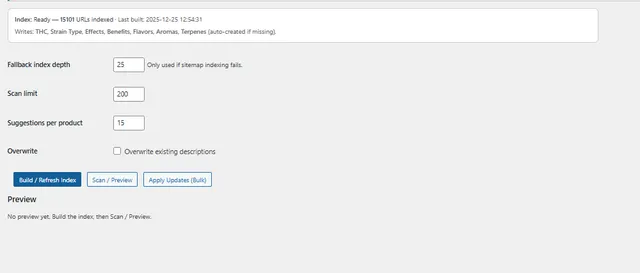
Launching a new strain on a WooCommerce menu used to mean a budtender or a VA with twelve AllBud tabs open, copy-pasting Indica/Sativa, terpene profiles, effects, lineage, and descriptions into a product, one field at a time, for every SKU you carry. It's slow, it's error-prone, and it's the kind of work that quietly eats 4-6 hours per menu refresh. Strain Sync points a WooCommerce product at an AllBud strain by URL or slug, pulls the public reference data, and writes it into your product as real attribute taxonomies — not blob text. Built for cannabis dispensaries, not retrofitted from a generic product importer. The free version already scans your catalog, suggests AllBud matches per product, and does an in-request bulk apply. Pro is for when that isn't enough: a background, resumable bulk sync that won't time out on a 400-strain catalog, unattended nightly refresh, custom attribute-mapping rules, and full sync logs with one-click rollback when a refresh writes something wrong.
The value · before and after
What changes for you.
- Before
Every menu refresh, someone sits in front of AllBud copy-pasting terpenes and lineage into products, one field at a time.
AfterPoint a product at an AllBud strain by URL or slug and the reference data is written into real attribute taxonomies.
- Before
That data entry quietly eats 4–6 hours per menu refresh.
AfterThe free version scans the catalog and suggests matches per product, then applies them in one pass.
- Before
A 400-strain catalog times out halfway through a bulk run.
AfterPro runs bulk sync as a background, resumable job that finishes, and a nightly refresh keeps it current with nobody clicking.
Why it is worth it
Versus doing nothing.
- Doing it by hand costs more in staff hours than the plugin costs in a year — that is the manifest talking, not a slogan.
- A generic product importer was not built for this; Strain Sync was built for dispensaries, with rollback when a refresh writes something wrong.
Straight answers
What it does not do.
- It pulls public strain reference data only — no pricing, no inventory, no regulated content.
- Free has no undo; sync logs and one-click rollback are Pro.
What is in the box
Free is the whole fix. Pro adds the heavy lifting.
Free · no purchase, no account
- AllBud strain lookupConnect a WooCommerce product to an AllBud strain by URL or slug.
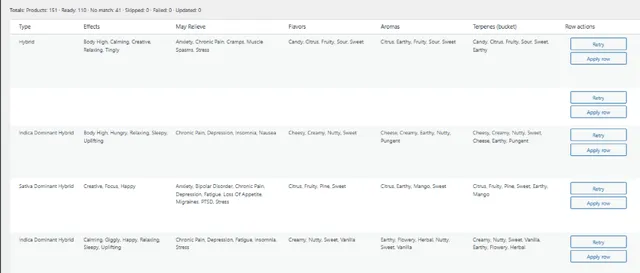
- Attribute syncPulls type (Indica/Sativa/Hybrid), lineage, dominant terpenes, and effects into proper WC attribute taxonomies.
- Optional description syncPull AllBud strain descriptions into product short description (toggleable per-product).
- Manual sync buttonRefresh a product's strain data with one click from the product edit screen.
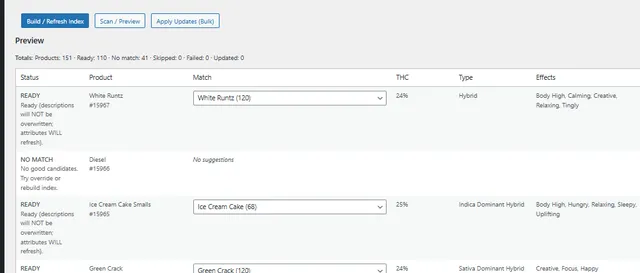
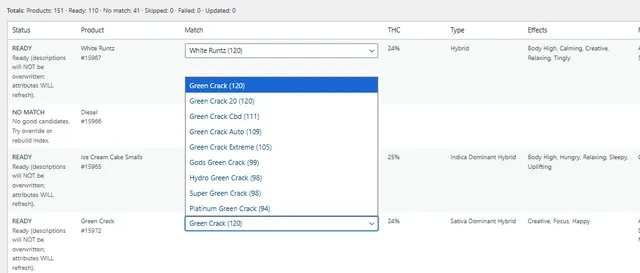
- Match suggestionsScans your catalog and suggests AllBud strain matches per product (ranked by name, with a 'suggestions per product' control) so you're picking from candidates instead of pasting URLs one at a time.
- In-request bulk applyApply strain updates across all matched products in one pass from the Sync tab. Runs synchronously in a single request — great for small catalogs; large catalogs (hundreds of strains) can hit PHP timeouts, which is what Pro's background bulk solves.
- Compliance-friendlyPulls public strain reference data only. No pricing, no inventory, no regulated content syncing.
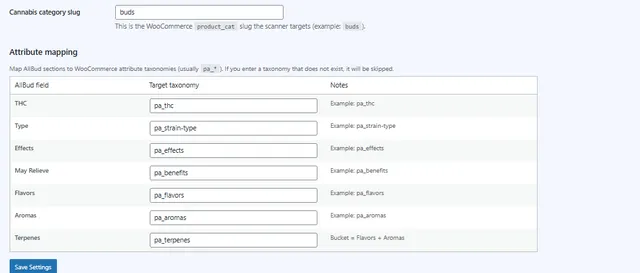
- Settings panelToggle which fields to sync, choose attribute mapping, configure default behaviors.
Pro adds · from $399/year
- Sync logs & rollbackThe real safety net. Before/after snapshot of every sync in a dedicated log table, and one-click rollback that restores descriptions + attribute terms if a refresh writes something wrong. Free has no undo — this is Pro-only.
- Background bulk sync (non-timeout, resumable)Free's bulk apply runs synchronously in a single request and times out on large catalogs. Pro runs bulk as a batched background job (Action Scheduler with WP-Cron fallback), persisting progress per item so it resumes on failure — so a 400-strain catalog is one job that actually finishes. This is the reason to upgrade, not 'bulk' itself (free already has an in-request bulk apply).
- Scheduled refresh (unattended cron)Hourly/daily/weekly auto-refresh of strain attributes so menu data stays current as AllBud updates entries — no one has to click anything. Free is manual-trigger only; unattended scheduling is Pro-only.
- Attribute mapping rulesMap AllBud's data fields to your custom WooCommerce attribute taxonomies — useful when your store schema doesn't match the defaults. Pro-only.
- Guided bulk match & confirmThe name-match suggestion engine ships in the free plugin. Pro adds a review-and-confirm screen for accepting matches across the catalog in one workflow instead of product-by-product.
- Priority email supportDirect line for dispensary operators. Cannabis verticals don't get standard SaaS support — we get that.
If any of these sound like you.
- 01
Single-location dispensaries on WooCommerce
Your menu refreshes weekly. Each refresh, somebody on staff is sitting in front of AllBud copy-pasting terpene profiles into product descriptions until midnight. Your hourly cost on data entry alone is more than this plugin costs in a year.
- 02
Multi-location dispensary chains
Three storefronts, three online menus, three people doing the same copy-paste loop. The 5-site and Agency licenses cover every location and the scheduled refresh keeps the data in sync across them — without three different team members typing the same terpenes three different ways.
- 03
Cannabis web agencies and dispensary devs
Every dispensary client quote includes the same line item: 'data entry for X strains.' Stop quoting it. The Agency Unlimited license covers every dispensary you build, and Pro's background bulk sync handles the initial launch as one resumable job that won't time out on a large catalog — instead of a sprint.
- 04
Cannabis brands running customer-facing menus
Your menu changes constantly — new drops, retired strains, rebrands. Scheduled nightly refresh means your online menu's terpene profiles and lineage stay current with AllBud's source data without anyone touching a product page.
Every screen is real
In the admin.
Questions people actually ask.
Does this require WooCommerce?
Yes. Strain Sync writes data into WooCommerce product attributes, taxonomies, and post meta. A non-WC site has nothing to sync into.
What does it actually pull from AllBud?
Strain type (Indica / Sativa / Hybrid), lineage / parent strains, dominant terpenes, reported effects, and (optionally) the AllBud strain description. Data is written to standard WooCommerce attribute taxonomies so it works with your existing filters, faceted search, and theme templates.
Is this compliance-safe?
Yes. The plugin syncs public strain reference data only — the same kind of educational catalog info AllBud already publishes openly. It does **not** sync prices, inventory levels, regulated medical claims, or anything you'd want a compliance team to review case-by-case. You stay in control of what's published on your site.
Why is the pricing higher than your other plugins?
Because Strain Sync replaces the alternative: paying a budtender or a virtual assistant to manually copy AllBud data into WooCommerce for every product. Even a small dispensary has 100+ active SKUs. At 5 minutes per product, you're spending 8+ hours of labor every menu refresh. The free version already scans, suggests matches, and does an in-request bulk apply; Pro pays for itself on larger catalogs where you need a bulk sync that won't time out, unattended nightly refresh, and one-click rollback when a sync goes wrong.
How does the license work?
Pro licenses are issued per site activation. The 1-Site tier covers one production storefront. The 5-Site tier covers up to five (good for chains and small agencies). Agency Unlimited is unlimited activations under one license. License checks run against bigbad.agency over HTTPS with a 24-hour cache, fail-closed on hard errors.
Can I switch tiers later?
Yes — upgrade from 1-Site to 5-Site or Agency at any time. You only pay the difference for the remainder of your billing cycle.
How often does Pro re-sync data?
Configurable. The default is nightly, but you can set it to hourly, weekly, or off. Manual sync is available in both tiers — per-product and an in-request bulk apply in free, plus Pro's background (non-timeout) bulk sync for large catalogs.
What happens if AllBud changes their site or breaks?
The plugin uses defensive parsing and degrades gracefully — if a single attribute can't be found, it leaves the existing WooCommerce value untouched rather than wiping it. Pro adds sync logs and one-click rollback so you can revert any sync that went wrong. We also push fixes promptly when AllBud changes their structure.
Where do I get support?
Free version: WordPress.org plugin support forum. Pro: email **support@bigbad.agency** with your license key. Cannabis verticals get real human support, not a chatbot.
Also on the shelf
More free plugins.
- Free on WordPress.org
AI Data Remover
ChatGPT and Elementor left invisible junk in your HTML. Find it. Strip it.
Details → - Free on WordPress.org
Deep eCommerce Insights
WooCommerce reports are a graveyard. We dig you out.
Details → - Free on WordPress.org
Store Toolkit
One plugin instead of fourteen. One settings tab instead of fourteen.
Details → - The shelf
All plugins
The whole catalogue, versions read from WordPress.org.
Browse →
Support: support@bigbad.agency